REVIEW · NAPLES
Naples: Pompeii Self Guided Audio Tour
Book on GetYourGuide →Operated by ITGUIDES · Bookable on GetYourGuide
Pompeii goes a lot faster with a guide in your pocket. This self-guided smartphone audio tour for Pompeii lets you hop between major sights—like the amphitheater and the House of the Vettii—while hearing stories, practical explanations, and what to look for on walls and floors. Two big wins are the low price (the guide is $4.70 per person) and the geolocated points (60+), so you’re less likely to wander past the good stuff. One drawback to plan for: the app experience depends on getting your activation right and downloading content ahead of time, since cellular service in the excavations can be unreliable.
You control the pace, and you don’t need a group schedule. The audio is tied to locations on an interactive map, and you can keep the guide in the app for later visits—handy if you want to return when you have more time. The main consideration is that the app navigation isn’t perfect in every situation, so I recommend building in a little patience as you learn the map workflow.
In This Review
- Key highlights you’ll actually use on-site
- Pompeii at your speed: what this self-guided audio format really means
- Getting the ITGUIDES audio working: activation, downloads, and what can trip you up
- Amphitheater to lupanare: how the audio tour guides your walking route
- The amphitheater
- The House of the Vettii
- The lupanare (brothel)
- Roman baths and daily routines
- Food, taverns, and strange-but-real processing details
- 4 hours on the ground: timing tips for a realistic Pompeii loop
- Using the map and geolocated points without getting lost
- Where this guide delivers best value (and who it fits)
- Support and languages: what to expect before you start listening
- FAQ
- FAQ
- Do I need an entrance ticket for Pompeii with this audio tour?
- How long will the audio guide be valid during my visit?
- Is there a meeting point?
- Do I need an internet connection in the archaeological site?
- How do I access the audio guide after I purchase?
- What languages are available in the audio guide?
- Is the tour wheelchair accessible?
- Should you book the Pompeii self-guided audio tour for $4.70?
Key highlights you’ll actually use on-site
- 60+ geolocated stops with audio, plus photo and text to match what you see
- Interactive map built for Pompeii wandering, not a straight-line route
- 4-hour validity from first activation, so you can plan a realistic visit length
- Offline-first approach: download locally before entering the archaeological site
- Multi-language audio in Italian, English, French, German, and Spanish
- Value check: far cheaper than buying an on-site audioguide ticket
Pompeii at your speed: what this self-guided audio format really means
Pompeii can feel like two trips at once: the awe of huge ruins, and the confusion of where to look next. This format solves the second problem by giving you audio that’s tied to specific spots, so you don’t have to interpret every doorway, mosaic, or worn stair by yourself. You’re effectively building a mini route from the map as you go.
I like that the tour doesn’t force a single itinerary. You can start wherever you want (based on the ruins’ open hours), take breaks, and pick the sights that interest you most. If you’re a “show me the famous frescoes” person, you can focus there. If you’re more into how Roman daily life worked, the guide has you covered.
The time window matters. The guide is valid for 4 hours from first activation, so you’ll want to decide how much of the site you can realistically cover in that span. If you’re slow at reading signs, stopping for photos, or waiting for restoration paths to reopen, plan for fewer stops and longer listening.
You can also read our reviews of more guided tours in Naples



Getting the ITGUIDES audio working: activation, downloads, and what can trip you up
This guide lives in the ITGUIDES app. After purchase, you download the app, open the menu, and follow the steps on the contact page to provide your app user ID along with your GetYourGuide order number. After that, the guide becomes available for your visit inside the app.
Two practical likes here. First, you can try the free demo before buying, which helps if you’re worried the app won’t feel intuitive. Second, you can get support through the app menu and via WhatsApp, which is useful when you’re standing in the ticket lines or trying to get signal.
Now, the part that can make or break your experience: downloads. The tour specifically advises that you should download the contents locally before going in, because the internet connection inside the excavations can be poor. So don’t rely on live streaming audio. Treat it like an offline playlist you build at home or at your hotel—then your on-site visit becomes much calmer.
There are also a few navigation quirks worth knowing so you’re not frustrated:
- If you listen to a point with more than one audio clip, the map’s check mark might not update even though both clips still play.
- After you listen to an audio selection, the app can bounce you back to the map and zoom out, meaning you may need to zoom in again to find your position.
- If you leave the app (for example to take a picture), some phone behavior can cause the audio to restart—so try to keep the app open when possible.
None of this ruins the concept. It just means you should give yourself a quick warm-up moment. Before you step deep into the site, check that your first stop audio plays and the map behaves the way you expect.
Amphitheater to lupanare: how the audio tour guides your walking route

Pompeii isn’t just big—it’s packed. The guide helps you turn “random ruins” into “places with meaning,” and that’s where a self-guided app can be better than a generic audio blob.
Here’s what you can expect to hear about, based on the tour content:
The amphitheater
You’ll get stories and explanations linked to the amphitheater, so you can understand what you’re looking at beyond the obvious stone seats and arches. This is one of those stops where audio turns confusion into clarity: you start to recognize why certain sections exist and what the space was used for.
The House of the Vettii
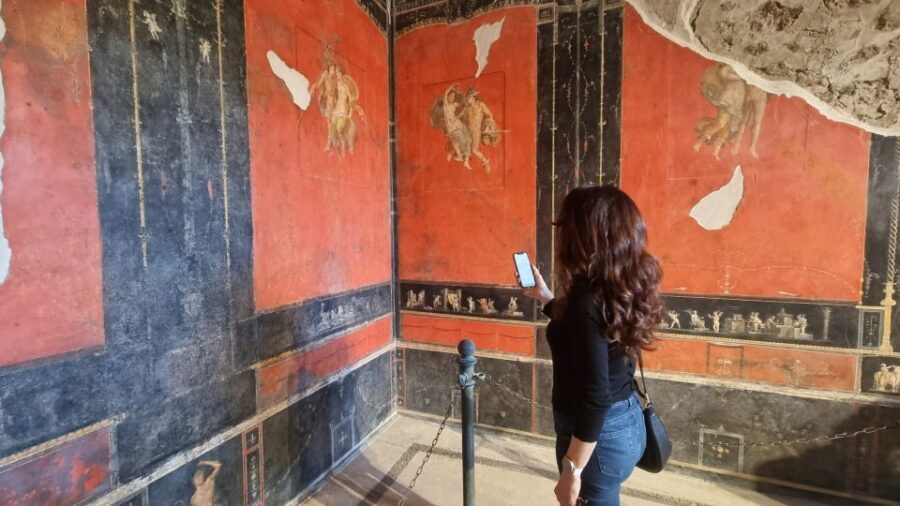
The guide also points you to the House of the Vettii, a classic Pompeii house you’ll likely hear mentioned even before you arrive. Audio here helps you connect frescoes, rooms, and details to the life happening inside those walls.
When you reach a house, focus on what survives: wall decoration, floor patterns, and the layout. The app’s hypertext descriptions can support what you see, especially when the tour highlights names of figures and technical terms.
You can also read our reviews of more tours and experiences in Naples





The lupanare (brothel)
If you want the more human, slightly uncomfortable side of Roman life, the lupanare section is part of the tour. Audio helps explain what it was and what you should watch for in the surviving features—so it’s not just shock value. It becomes history you can actually picture.
Roman baths and daily routines
The guide doesn’t limit itself to famous buildings. You’ll also hear about how ancient Roman baths worked and how the system of rooms and processes functioned. For a lot of visitors, this is where Pompeii becomes practical—Roman technology and habits stop feeling abstract.
Food, taverns, and strange-but-real processing details
Another strength is that the guide doesn’t keep you in the realm of elite villas only. You get audio about what people ate in Roman taverns, including how bread was made and how everyday work was done—down to details like the use of urine in certain wool-processing practices. It’s gritty, but that’s the point: Pompeii shows the whole machine, not just the fancy parts.
4 hours on the ground: timing tips for a realistic Pompeii loop
The guide’s duration is 4 hours from first activation, but Pompeii “time math” is tricky. Even if you’re moving fast, you’ll probably slow down at the moments that matter: fresco-heavy rooms, well-preserved mosaics, and spots where the app prompts you to look closer.
Here’s a smart way to use the time window:
- Choose a priority set from the map (for example: amphitheater + one or two domus + one theme like baths).
- Expect some locations to be affected by restoration and temporary closures. The site is dynamic, and paths can change.
- If you arrive late in the day or start after a long climb, don’t try to clear all 60+ stops. Pick the “can’t miss” audio first.
One nice detail in the tour design is that you’ll be able to see where you’ve already been on the map (so you’re less likely to loop the same areas by accident). That’s especially helpful when the site starts to feel like a maze.
If you’re visiting with a range of interests—someone who wants the big-name monuments and someone who wants the everyday-life explanations—this app style works because each person can control what they listen to at each point.
Using the map and geolocated points without getting lost

Geolocation is the heart of this product. More than 60 points of interest are mapped with audio/photo/text, and that means your phone becomes a real navigation tool rather than just a narrator.
A few “map sanity” tips based on the way the app is described:
- Download the content first, then treat the map as offline navigation.
- Look for the check marks on the map to track progress, but don’t panic if one fails to show up when multiple clips play.
- If you notice the app zooms out after listening, be ready to zoom back in to get your bearings.
One limitation that matters: some people report there isn’t always a clear dot showing your exact location. If you’re used to turn-by-turn navigation, you might find yourself relying more on the map itself and landmarks. I’d handle this by planning your first 2–3 stops in advance, so you’re not learning the system while stressed.
Also, the guide includes both audio and hypertext descriptions. Those links can help when you’re trying to decode names of gods, heroes, or technical terms that show up in the narration. When you pause to read, you’ll understand what you’re seeing faster.
Where this guide delivers best value (and who it fits)

At $4.70 per person, the guide is cheap enough that it’s not competing with your budget for other tours. The big value is that you’re not paying for a fixed group experience. You’re paying for a tool that helps you connect meaning to the ruins while you walk.
This is a particularly good fit if:
- You like self-paced travel and don’t want to synchronize your steps with a group.
- You enjoy detailed context (how baths worked, how bread was made, how materials were processed).
- You’re comfortable using your phone for navigation and audio.
- You’d like the flexibility to return later, since the guide is designed to be reused in future visits.
It’s also useful if you’re traveling in a way that doesn’t lend itself to booked tours. Pompeii works best when you can choose your exact stops, because closures and your own interests shape the day.
If you’re the type who wants a live human guide answering questions on the spot, this app will still help, but it won’t replace that. It’s best seen as a strong “on-site teacher” in audio form.
And if your phone battery is unreliable, bring a power bank. You’ll use GPS and audio, and Pompeii is not the place to run out of juice right when you’re standing in front of a key fresco.
Support and languages: what to expect before you start listening

The guide is available in five languages: Italian, English, French, German, and Spanish. That’s a big deal if you’re traveling with friends or family who prefer different languages, or if you want to switch depending on the section.
Another practical strength: help is built into the process. The setup involves steps with your app user ID and your order number, and some people report fast assistance from support contacts during installation and unlocking/activation steps. One person specifically mentioned Vincenzo helping them install and get the audio guide activated quickly. Another account mentioned an archaeologist named Theresa in the context of guidance and knowledge on the day.
So if you’re the nervous type about getting apps working while you’re abroad, that human support detail is worth taking seriously.
FAQ

FAQ
Do I need an entrance ticket for Pompeii with this audio tour?
Yes. The Pompeii site entrance ticket is not included. You’ll need to buy the entrance separately.
How long will the audio guide be valid during my visit?
The guide is valid for 4 hours from your first activation.
Is there a meeting point?
No. This is a self-guided smartphone activity with no meeting point.
Do I need an internet connection in the archaeological site?
You should download the guide contents locally before going in, because the internet connection in the site can be poor.
How do I access the audio guide after I purchase?
Download the ITGUIDES app, then use the in-app contact steps to send your app user ID and your order number so the Pompeii guide can be activated in your app.
What languages are available in the audio guide?
The guide is available in Italian, English, French, German, and Spanish.
Is the tour wheelchair accessible?
Yes, it’s listed as wheelchair accessible.
Should you book the Pompeii self-guided audio tour for $4.70?
Book it if you want maximum flexibility and you like learning while you walk. The low price, the geolocated 60+ stops, and the fact you can reuse the guide later are strong reasons to choose this format. It’s especially worth it if you’re planning to cover a decent chunk of Pompeii in one visit and you want your phone to do the pointing.
Skip it (or at least pair it with a different type of learning) if you hate app-based navigation, you don’t like troubleshooting activation steps, or you need a live person to explain details as you go. If you do book, do one thing that matters most: download everything before entering, then your day will feel smooth and your walking will feel purposeful.